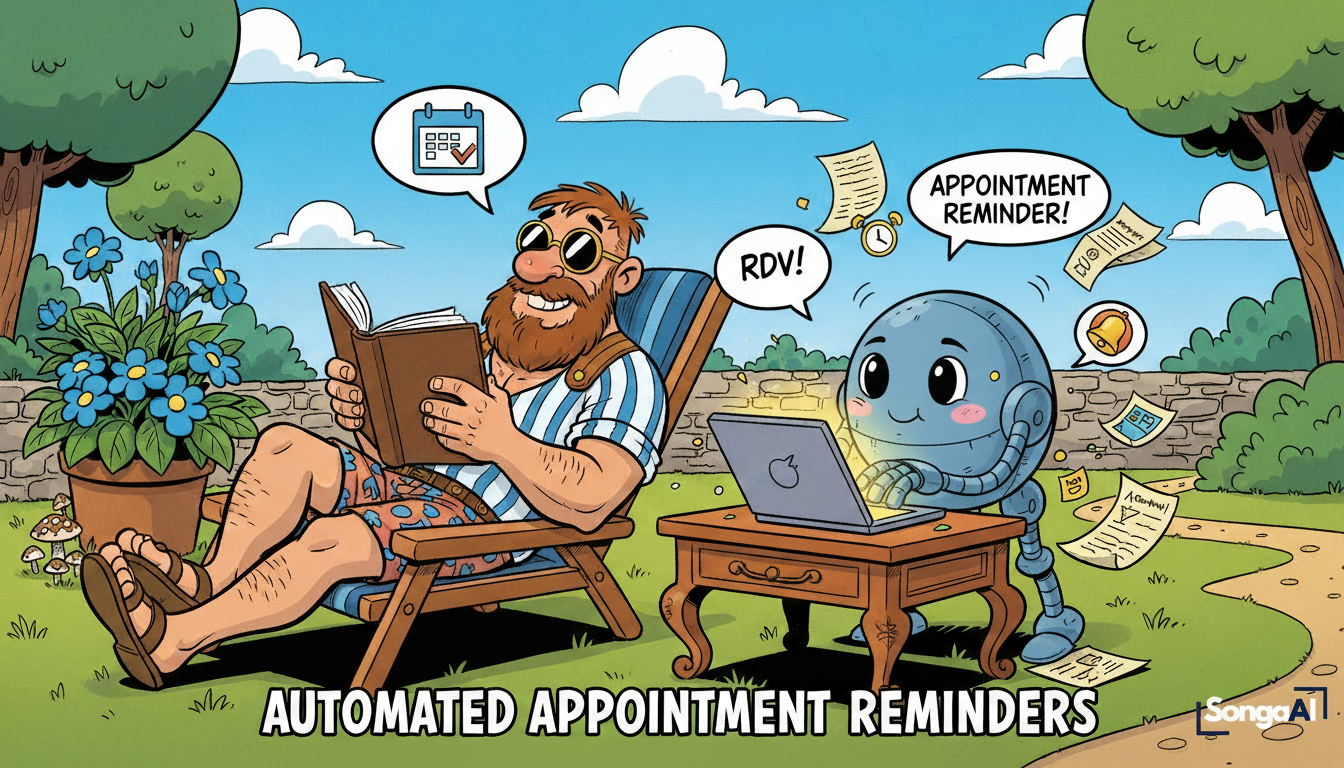
What if your calendar stopped fighting you—and started working for you?
Here’s a painful stat: The average service business loses $8,000-12,000 annually to forgotten appointments. Ever feel like your calendar is secretly running your day? Appointments overlap, clients forget to show up, reschedules slip through the cracks — and suddenly you’re firefighting instead of actually getting work done.
That’s why automated appointment reminders are such a lifesaver.
They keep your schedule clean, your clients informed, and your brain unburdened. Think of them as a friendly assistant who never forgets, never procrastinates, and always sends messages right on time.
In this guide, we’ll explore what automated appointment reminders are, how they work inside GoHighLevel, who benefits most, and how simple workflow logic can dramatically reduce no-shows and reclaim hours of your week.
If you’re new to workflow automation in general, start with
👉 Workflow Automation for Small Business or👉 5 Powerful No-Code Automation Examples
for the bigger picture.
What Are Automated Appointment Reminders?
Imagine this: you’re enjoying your morning coffee when your phone buzzes.
“Reminder: Strategy Session with Linda today at 10:30 AM”
The best part?
You didn’t send it.
You didn’t even think about it.
That’s exactly what automated appointment reminders do — they send timely, helpful messages before and after appointments without any manual involvement.
In practical terms:
Automated appointment reminders = triggered messages via SMS or email that prevent no-shows, encourage confirmations, and keep clients engaged throughout the entire appointment journey.
These reminders:
- Confirm appointments
- Reduce forgetfulness
- Offer quick rescheduling
- Deliver prep instructions
- Send follow-ups afterward
- Boost attendance rates
They work in the background so you can focus on serving clients, not chasing them.
Why Automated Appointment Reminders Matter
1. No More No-Shows
Forgetfulness is normal — automation fixes it.
A simple 24-hour reminder can cut no-shows dramatically, and adding a 2-hour reminder brings the rate even lower. Most small businesses report 25–40 % fewer missed appointments after implementing a consistent sequence.
2. Your Team Saves Hours Every Week
Instead of calling, texting, or checking calendars manually, automated appointment reminders handle every touchpoint with perfect consistency.
3. Everything Feels Professional
Polished, on-time reminders elevate your brand. Clients feel cared for before they even meet you.
4. Automatic Post-Appointment Follow-Ups
Review request? Feedback? Next-step instruction?
Automation does the asking politely and on time — every time.
5. Scales Effortlessly
Whether you have 5 appointments a week or 50, automated appointment reminders deliver like clockwork.
How Automated Appointment Reminders Work in GoHighLevel
Let’s walk through what actually happens behind the scenes.
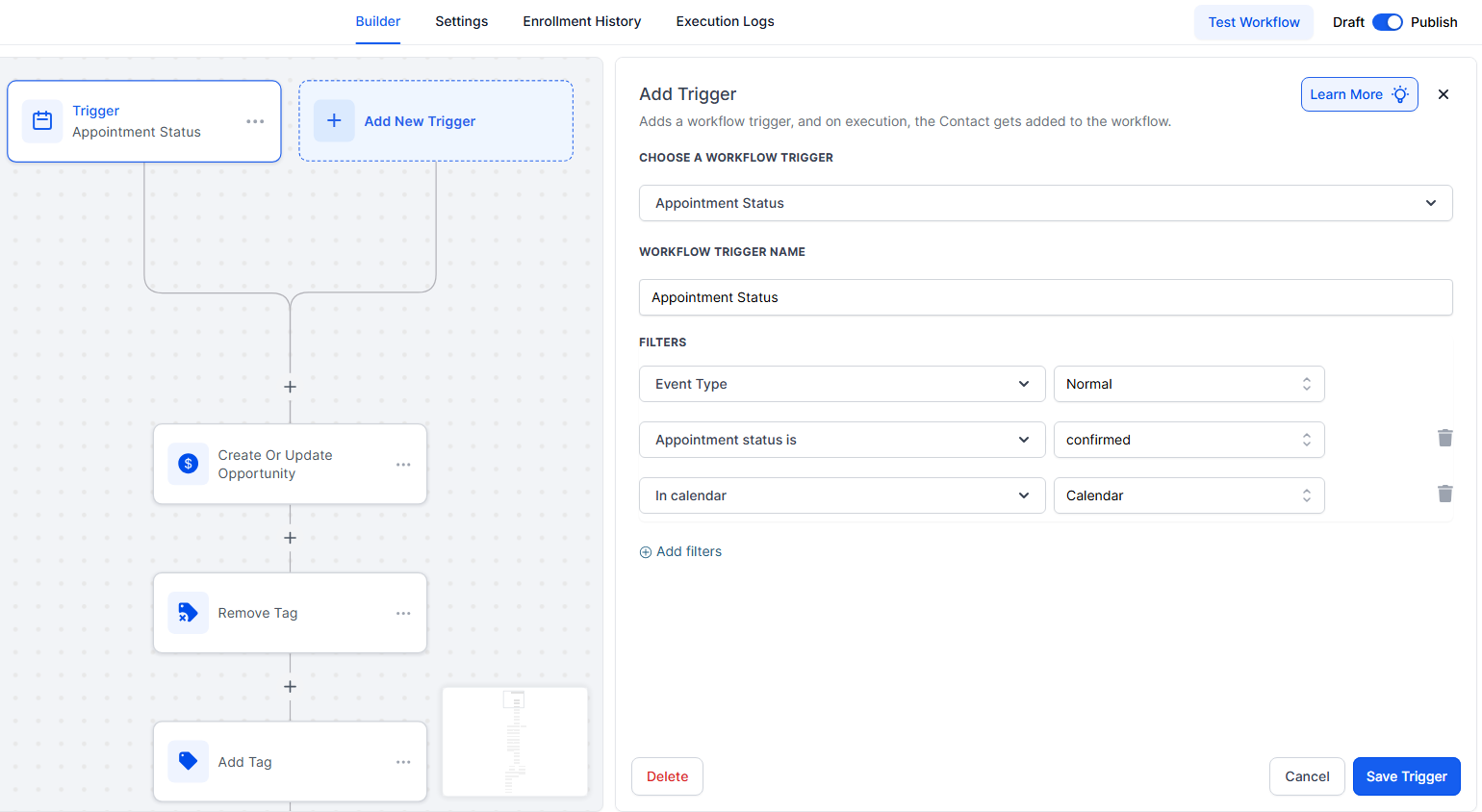
Step 1: Appointment Booking Triggers the Workflow
A client books through your website, funnel page, or embedded GHL calendar. Their appointment instantly triggers a workflow — no manual input needed.
Step 2: Personalized Reminder Sequence
This is where GoHighLevel really shines.
Typical sequence:
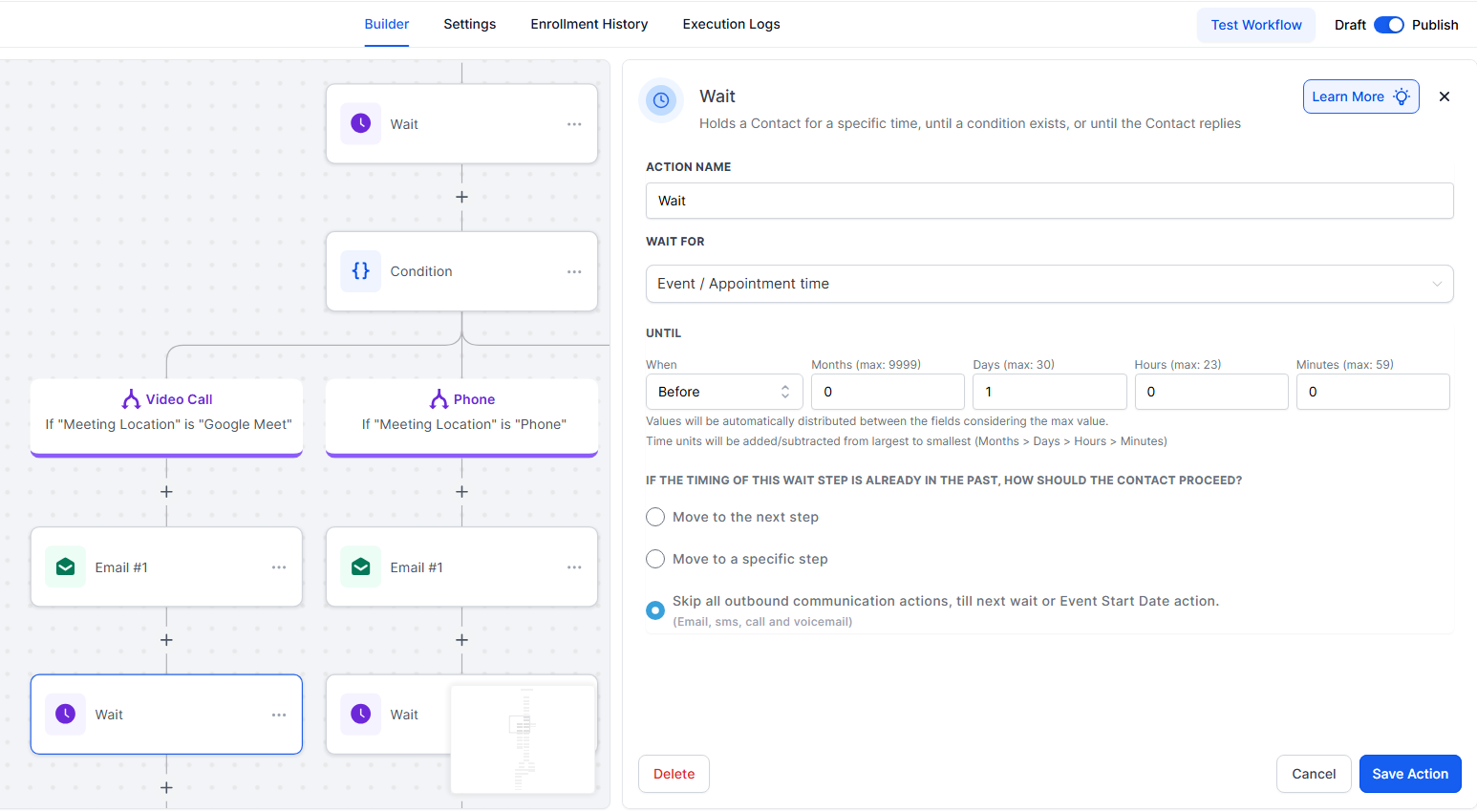
24 hours before — gentle reminder
2 hours before — “See you soon!” message
Immediately after — thank you + review request
Each reminder can include the client’s name, appointment time, location, prep details, and a one-click reschedule link-all personalized automatically using GoHighLevel’s merge tags.
Step 3: Smart Outcome Handling
Automated appointment reminders are only half the story — GoHighLevel also handles what happens next.
Confirmed Appointment
Tag applied → pipeline updated → no further reminders.
Cancelled Appointment
A polite message sends automatically, followed by an instant reschedule link.
Invalid Appointment
If data isn’t correct (test booking, missing fields), the workflow notifies your team immediately.
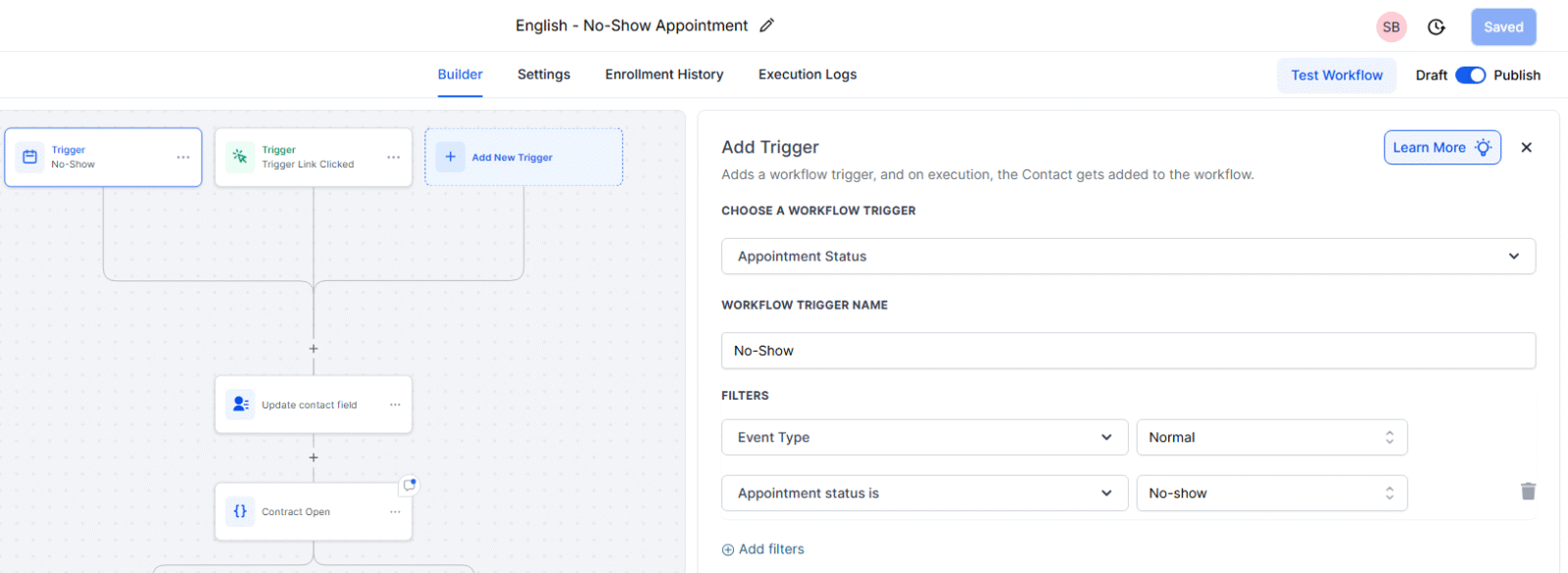
No-Show
A 30-minute post-slot message offers a rebooking link — recovering many missed appointments.
Step 4: Reporting & Optimization
Inside GHL, you can track:
Confirmation rates
Cancellation patterns
No-show volume
Peak booking times
Staff-specific performance
This helps refine timing, messaging, and workflow structure.
Curious how AI fits into this world?
You’ll love 👉 AI Automation for Business
Now that you understand the mechanics, let’s explore which industries see the biggest impact from automated appointment reminders.
Who Benefits Most From Automated Appointment Reminders?
Every service business benefits — but four industries experience game-changing improvements.
Salons & Spas
Beauty appointments often get booked weeks in advance—plenty of time for clients to forget. Automated appointment reminders solve this by sending timely texts that not only confirm the booking but also include helpful prep instructions like “Please arrive makeup-free for your facial.” The result? Fewer no-shows, faster rebooking of open slots, and zero awkward phone calls chasing confirmations.
Fitness Coaches & Personal Trainers
Fitness clients start motivated, but life gets busy. A missed session disrupts momentum and leaves revenue on the table. Automated appointment reminders keep clients accountable with friendly nudges 24 hours before their workout. Plus, if someone misses a session, a quick follow-up message 30 minutes later helps reactivate them before they ghost completely.
Consultants & Coaches
For consultants, your calendar is your revenue. A single missed strategy call equals a missed opportunity. Automated appointment reminders reduce missed intro calls while ensuring clients arrive prepared. Smart workflows can include pre-call questionnaires, meeting agendas, and relevant materials—so when clients show up, they’re ready for a productive conversation. The professional, consistent communication also strengthens your positioning before the first call even happens.
Local Home-Service Providers
Plumbers, electricians, roofers, cleaners—these businesses depend on punctuality and access. Automated appointment reminders confirm someone will be home when your team arrives, eliminating wasted drive time to locked houses. Messages can include arrival windows, parking instructions, and prep details like “Please clear access to your electrical panel.” Post-job follow-ups then request reviews and offer future service discounts—systematically building your local reputation without manual effort.
Real-World Examples
Here are two examples that capture real results.
A Spa Cuts No-Shows by 45%
A wellness spa used to lose multiple appointments per day—until they implemented automated appointment reminders with a 24-hour and 2-hour sequence. The results? No-shows dropped 45%, staff saved 3-4 hours weekly, and the spa collected 70 new Google reviews in just eight weeks. Prep instructions reduced delays and misunderstandings, creating a smoother experience for everyone.
A Consulting Agency Eliminates Missed Intro Calls
A B2B consultancy synced their GoHighLevel calendar with their pipeline. Now when a prospect books a call, they automatically receive prep instructions, a 24-hour reminder, a 2-hour reminder with the meeting link, and a follow-up email with next steps. Result: 100% fewer missed intro consultations and significantly smoother client onboarding.
The ROI of Automated Appointment Reminders
Let’s run the numbers.
Scenario A — Small Business
20 appointments per week
$75 per appointment
3 no-shows weekly → $225 lost
Reducing no-shows by 40% saves:
$4,680 annually
Scenario B — Growing Business
40 appointments weekly
$100 per appointment
5 no-shows weekly → $500 lost
A 40% reduction saves:
$10,400 annually
Scenario C — Solo Consultant
8 calls weekly
$250 per strategy call
1 no-show weekly → $250 lost
40% reduction = $5,200 yearly
for a single, simple automation.
Common Mistakes to Avoid
Even the best automated appointment reminders can backfire if you’re not careful. Here are the most common pitfalls—and how to sidestep them.
Sending Too Many Messages
It’s tempting to “make absolutely sure” clients remember, but anything beyond 2–3 reminders feels intrusive. Stick with strategic timing: one reminder 24 hours out, another 2 hours before, and one post-appointment follow-up. That’s the sweet spot where you’re helpful without being annoying.
Not Personalizing Messages
Generic reminders like “You have an appointment tomorrow” feel robotic and impersonal. Automated appointment reminders work best when they include the client’s name, specific appointment time, and service type. Small touches like “Hi Sarah, see you tomorrow at 2 PM for your strategy session” make all the difference in how clients perceive your business.
Ignoring No-Show Follow-Ups
Don’t let a missed appointment be the end of the story. A gentle “We missed you today—want to reschedule?” message sent 30 minutes after the slot can recover up to 30% of lost clients. Most no-shows happen because of genuine forgetfulness, not disinterest, so a friendly nudge often gets them back on your calendar.
Forgetting Team Alerts
Your automated appointment reminders shouldn’t just communicate with clients—they should keep your team in sync too. Add internal Slack or email notifications when appointments get cancelled, rescheduled, or marked as no-shows. This prevents double-bookings and ensures everyone knows what’s happening in real time.
Not Testing Messages First
Nothing damages credibility faster than a reminder with typos, broken reschedule links, or incorrect merge tags showing “Hi {{contact.first_name}}” instead of the actual name. Always test your entire SMS and email flow with real data before activating automated appointment reminders. Send yourself test messages, click every link, and verify personalization tokens work correctly.
FAQ — Automated Appointment Reminders
Are automated appointment reminders annoying?
Not when they’re friendly, short, and timely. Most clients appreciate the clarity.
Can I customize reminders by service or staff?
Yes. GoHighLevel supports conditional logic for appointment types, locations, and team members.
Do clients receive reminders on mobile?
Yes — SMS is the most common channel for automated appointment reminders.
Do I need coding skills?
No. The entire setup is drag-and-drop inside GoHighLevel.
Can I send reminders after appointments too?
Absolutely — perfect for review requests or next-step information.
How many reminders should I send?
Most businesses use 2–3. More than that can feel spammy.
Can automated appointment reminders reduce cancellations?
Yes — when clients receive timely updates, they’re more likely to reschedule responsibly.
Can reminders integrate with AI tools?
Yes — AI can help write messages, summarize client context, or personalize content.
Celebrate Your Newfound Freedom
You’ve now built a system that never forgets, never sleeps, and always keeps your schedule running smoothly. With automated appointment reminders, you reduce no-shows, save hours, and offer a polished experience that clients genuinely appreciate.
Pour that extra cup of coffee
and let your workflows take care of the rest.
Ready to build your own automated appointment reminder system?
Book your free automation audit with SongaAI.