Hey there, business champs! Ever wish you could clone yourself — one you for clients, one for emails, and one just to keep the invoices straight? That’s basically what AI automation for business delivers (without the cloning ethics debate). By blending the brains of AI with the hands of workflow tools, you turn scattered tasks into smart, reliable systems.
Here’s the shift: old-school automation was “if this, then that.” AI-powered automation understands context, adapts, and picks the best next step. It can sort customer emails by intent, write the right reply, push data into your CRM, and follow up — while you focus on the work that actually moves the needle.
In this guide, we’ll break down what AI automation for business is, why it’s different from generic workflow automation, which tools belong in a modern stack, and two real-life setups you can model today. By the end, you’ll know exactly where to start and how to scale without burning out your team (or your calendar).
If you’re new to automation, start with our earlier guides:
Those posts cover the foundations — what automation actually is and how to build your first workflows without code. This article takes it a step further by showing how AI automation for business adds intelligence and decision-making to those workflows.
What Exactly Is AI Automation for Business?
Traditional automation follows rigid rules:
If this happens → then do that.
Useful, but fragile. Change the input a little, and the whole thing wobbles. AI automation for business adds two game-changers: context und decision-making.
Context: Large language models (LLMs) understand text like a human. They can read a message, detect tone, extract entities (company, amount, due date), and classify intent (lead vs. support).
Decision-making: Instead of one fixed action, AI selects the best branch. Ask: Is this a lead? Is it urgent? Which template fits? The system decides, then your automation platform executes.
Mini-example: A regular workflow sends everyone the same confirmation email. AI workflow automation reads the inquiry, recognizes it’s a pricing request, drafts a tailored reply, schedules a follow-up, and creates a CRM task if there’s no response in 48 hours. Same trigger, smarter outcome.
This is why AI automation for business isn’t just faster — it’s more accurate, more personal, and easier to maintain at scale.
Why AI Automation Is the Next Big Productivity Leap
Smarter, Not Harder
AI analyzes, decides, and personalizes. It summarizes long threads, picks the right reply, and routes edge cases to a human. That’s AI automation for business in one line: less clicking, more thinking.
Consistency Without Burnout
Bots don’t forget. They apply the playbook the same way at 2 pm and at 2 am. That consistency compounds into higher CSAT, cleaner data, and steadier pipelines.
Time & Cost Efficiency
Every repetitive task you automate frees minutes that add up to hours per week. Teams that adopt AI-powered automation routinely report 10–15 saved hours weekly and fewer correction loops.
Personalization at Scale
No more one-size-fits-all. AI tailors messages by intent, history, and tone — so even high-volume communication feels human.
Cleaner Ops, Better Data
AI classification and extraction (names, dates, amounts) make your data warehouse/CRM far more trustworthy. Decisions improve when inputs stop being messy..
6 Must-Have AI Automation Tools for Business (2025 Edition)
ChatGPT (OpenAI) – Your conversational brain. Create emails, summarize tickets, generate drafts, classify intent, and power chatbots. Great foundation for AI automation for business where language is the raw material.
Perplexity – Research copilot. Pull concise, source-aware insights to feed briefs, newsletters, or decision nodes inside Make/n8n. Ideal for market scans you want to automate monthly.
Claude (Anthropic) – The nuanced analyst. Excellent with long docs, policies, proposals, and empathetic messaging. Pair with Make to extract structured data from PDFs and reduce manual review.
Make.com – Visual automation hub. Connect your apps, call LLMs, branch with routers/filters, and build resilient, multi-step systems. The “hands” that execute AI workflow automation at scale.
GoHighLevel (GHL) – CRM + messaging + bookings. Automate lead capture, nurturing, reminders, and reviews. Use AI steps for smart replies and appointment handling that feel personal.
n8n – Open-source power with agent capabilities. Self-host or cloud. Perfect when you need custom logic, webhooks, and AI agents with fine-grained control.
Stack pattern:
LLMs (ChatGPT / Claude / Perplexity) = brain. Make / GHL / n8n = hands. Together they deliver reliable AI automation for business.
Want to see how these tools perform in real life?
In our post 5 Powerful No-Code Automation Examples, we showed how small businesses use Make.com and GoHighLevel to automate daily operations — all without touching a single line of code. Those same workflows become even more powerful when paired with AI automation for business tools like ChatGPT or Claude.
Real-World Examples of AI Automation in Action
AI automation for business is no longer theoretical — it’s visual, accessible, and surprisingly fun to build. Let’s look at two examples that show how the newest AI tools and no-code platforms are already changing the way teams work.
Example 1: Building a Multi-Agent Customer Support System (OpenAI Agent Builder + ChatKit)
(Based on OpenAI Dev Day 2025)
OpenAI’s latest release introduced three groundbreaking tools — Agent Builder, ChatKit, and Widgets — that let anyone design intelligent, multi-agent chatbots visually.
Here’s how the setup works:
Classifier Agents detect whether a visitor is an existing customer or a new lead.
Support Agents answer questions using a connected knowledge base.
Lead Agents capture information and send it straight to your CRM via MCPs (Model Context Protocols).
Through ChatKit, you embed the bot on your website, customize the interface, and deploy it — no coding, no IT queue.
Impact: 24/7 instant responses, fewer tickets for your team, and happier leads who feel personally attended to. It’s a clear look at where AI automation for business is heading: smart, specialized agents collaborating seamlessly.
“The CLI (Command Line Interface) is daunting for people… computers didn’t hit mainstream adoption until there was a graphical interface on top.” — Greg Isenberg
Example 2: AI-Powered Lead Response Workflow (Facebook Leads + Claude via Make.com)
If you’re running ads on Facebook Lead Ads, every lead counts — but speed decides who wins the deal . Most small businesses lose opportunities simply because no one replies fast enough, this worklflow fixes that.
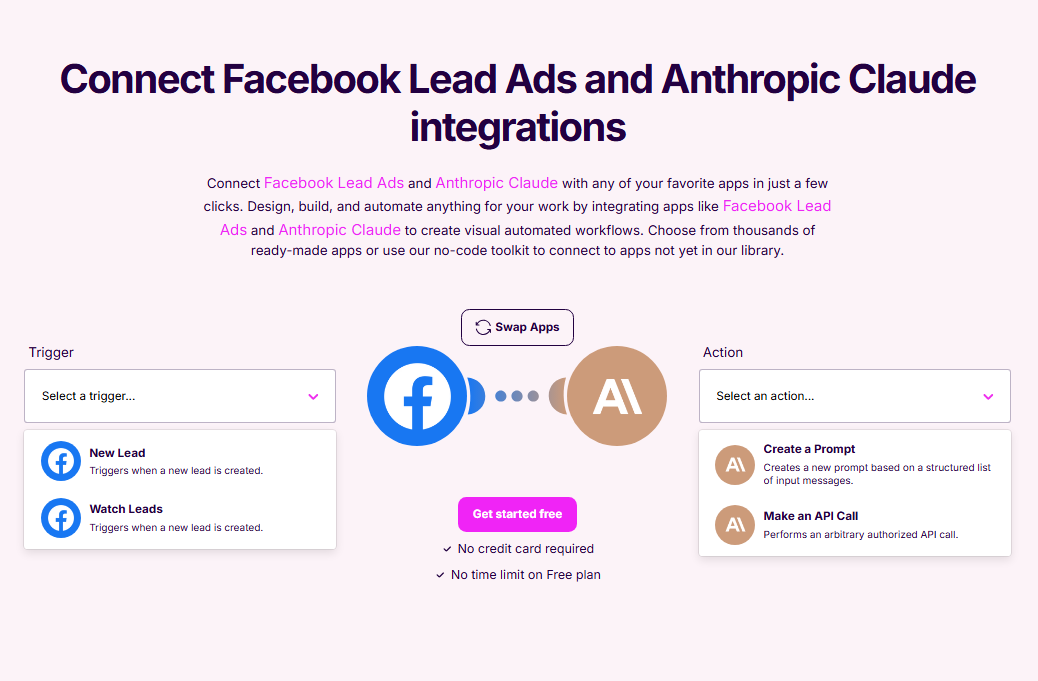
When a new Facebook Lead Ad submission comes in, Make.com triggers Claude (AI) to analyze the message and craft a personalized, natural-sounding response within seconds. Claude can also decide whether the inquiry looks like a hot lead, general question, or spam and route it accordingly — for example:
Hot leads → auto-reply with a booking link and push to your CRM
General questions → send a friendly, AI-written answer and tag for follow-up
Spam or duplicates → archive instantly
It’s a perfect showcase of AI automation for business in action: fast, contextual, and completely no-code. You spend less time chasing forms — and more time closing deals.
Connecting Facebook Lead Ads with Anthropic Claude inside Make.com — every new lead triggers an instant AI-crafted reply and smart routing.
Result: No more manual triage. You focus only on conversations that actually convert — a clear win for AI automation for business that boosts both revenue and responsiveness.
How to Start with AI Automation (Without Getting Overwhelmed)
Perplexity for research/briefs you’ll reuse in flows.
Choose your automation engine.
Make.com for multi-app workflows and robust logic.
GoHighLevel for CRM + messaging + bookings.
n8n when you want open-source flexibility or agent behaviors.
Connect brain + hands. Example: Gmail → Make → ChatGPT (summarize + classify) → GHL (create contact + start sequence) → Slack alert if VIP. That’s AI automation for business in one flow.
Test with sample data, then pilot. Add guardrails (filters, error handlers), log outputs, and document the flow name, trigger, inputs/outputs, and owner.
Measure & iterate. Track hours saved, response times, error rates, and conversion lift. Scale only what proves ROI.
Common Myths About AI Automation
“Too complex for small teams.” Modern tools are visual and intuitive — no IT degree needed. You can literally drag, drop, and connect your favorite apps. Start with one process and a simple success metric. The best part? You can scale your AI automation for business setup step by step as you grow.
“I need to code.” Nope. Tools like Make.com and GoHighLevel handle the heavy lifting. With LLM prompts and drag-and-drop logic, you can automate up to 80 % of everyday workflows. That’s the beauty of AI automation for business — it’s technical power wrapped in a no-code interface.
“It replaces people.” Not at all. AI doesn’t replace humans — it replaces repetition. Your team can finally focus on creative, strategic, or client-facing work while AI handles the predictable, time-consuming tasks. Think of it as hiring an extra pair of digital hands, not losing your own.
“It’s risky for data.” Security is actually stronger with structured AI automation for business. By using reputable vendors, limiting context, applying role-based access, and keeping activity logs, you gain visibility instead of losing control. Automation brings consistency — and consistency builds trust.
The Future: Agentic Ops
We’re moving toward agent-driven operations — systems that plan, act, and self-correct. Your future tech stack will look like this: an AI agent prioritizes work, triggers Make or n8n flows, asks for help when confidence is low, and documents what changed.
That’s AI automation for business 2.0 — not just doing faster, but deciding smarter.
For small businesses, this means scaling service quality without scaling headcount. The winners of tomorrow won’t have the biggest teams — they’ll have the smartest systems, where people and AI collaborate seamlessly.
Ready to Automate Smarter?
Curious where AI automation for business could save you 10 + hours each week? Book your free automation audit with SongaAI— we’ll map quick wins, design a safe pilot, and help you launch it with confidence.