

If you enjoyed our last adventure in Workflow Automation for Small Business, you already know that automation is like having your own personal butler — minus the bowtie and awkward small talk.
Now, let’s take it up a notch.
Because today, we’re not just talking about automation — we’re building it.
Welcome to the world of no-code automation examples, where workflows practically run themselves, and your keyboard finally gets the break it deserves.
So… What Exactly Is No-Code Automation?
Picture this: you’re juggling ten things at once — replying to leads, updating spreadsheets, chasing invoices, and trying to remember where that one link lives. Feels like a circus, right?
Now imagine a way to connect all those apps — Gmail, Google Sheets, Slack, your CRM — so they talk to each other automatically.
That’s no-code automation: the art of building powerful workflows without writing a single line of code.
You don’t need to be a tech wizard or whisper sweet nothings to APIs.
You just drag, drop, and let the magic happen.
These no-code automation examples show you exactly how.
Why It Matters (and Why You’ll Love It)
Let’s be real — running a small business often feels like spinning fifteen plates while someone keeps adding more.
No-code automation takes a few of those plates off your hands. Here’s how:
1. You save serious time.
Every minute you spend manually updating data is time you’re not growing your business. Automate that, and suddenly you’ve got hours back every week with no-code automation examples tailored to your needs.
2. You stop making silly mistakes.
We all make them. (Remember the email you meant to send to one person but went to the whole list?) No-code tools help you eliminate those “oops” moments.
3. You focus on what actually matters.
Instead of being stuck in admin loops, you get to focus on strategy, customers, and ideas — the stuff that actually moves the needle.
No-code automation is your silent business partner: reliable, invisible, and always on time.
From Workflow to No-Code: The Natural Next Step
In our last post, we talked about workflow automation as a big-picture concept — how tools like Make.com or GoHighLevel streamline your processes.
No-code automation is where that idea gets personal.
It’s where you stop talking about automation and start building it.
No developers. No coding bootcamps. Just you, your favorite apps, and a little creative problem-solving.
Think of it as your business glow-up: the same foundation, but now you’re doing it with style — thanks to a few smart no-code automation examples.
5 No-Code Automation Examples You Can Start Using Today
Let’s skip the theory and jump straight into the good stuff.
Here are five no-code automation examples small businesses can use to save time, boost consistency, and keep customers happy — all with minimal effort.
1. The “Instant Reply” Workflow
Problem:
You finally get a new inquiry through your website — a potential customer ready to talk. But between meetings, projects, and messages piling up — it often takes hours before anyone responds. By then, the moment is gone, and the lead has already booked with a faster competitor. Slow response times don’t just cost opportunities — they quietly chip away at your brand’s credibility.
Solution:
With a GoHighLevel instant lead response workflow, that delay disappears.
The moment a prospect submits your contact form, the system notifies your team, assigns the lead, and automatically launches a live call — connecting you with the new lead within 60 seconds.
If you’re not available to take the call, the workflow instantly triggers a personalized SMS and email sequence with a direct booking link, so the conversation keeps moving even when you’re busy.
Everything happens seamlessly, with timing that respects your business hours and keeps communication professional.
Real-World Impact:
This workflow ensures that no lead ever falls through the cracks. You’re no longer playing catch-up — you’re first in line. Businesses using this setup see dramatic improvements in conversion rates, more booked appointments, and stronger first impressions. It’s one of those no-code automation examples that turns interest into action — fast, friendly, and fully automated.
2. The Invoice Data Extractor
Problem:
You receive dozens of invoices every week — clients, vendors, services — and each one ends up as a PDF buried in your inbox. Someone still has to open every file, copy numbers into a spreadsheet and double-check totals and dates. It’s slow, repetitive, and one typo away from a reporting headache.
Solution:
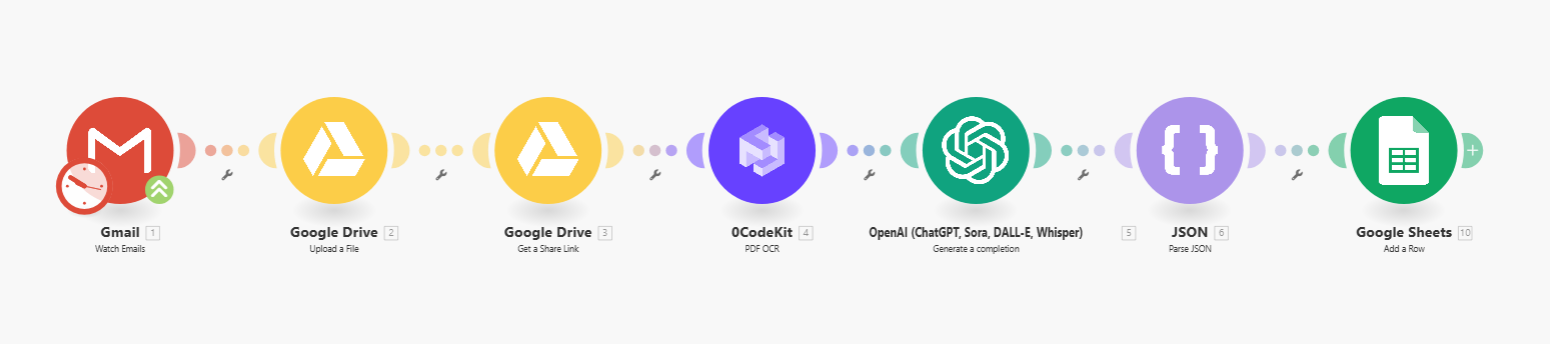
This no-code automation does the heavy lifting for you. The workflow monitors a designated Google Drive folder for new PDFs. Each file goes through OCR (Optical Character Recognition) to extract text, and AI identifies the key details — invoice number, date, amount, client, and service type.
Once parsed, the data is automatically written into a Google Sheet ready for accounting, analytics, or uploads into your CRM. No manual entry, no missed fields, no late-night copy-paste sessions.
Real-World Impact:
Teams using this setup save hours every week and drastically reduce human error. Reports become cleaner, cash-flow tracking becomes instant, and monthly reconciliations stop feeling like punishment. It’s one of those no-code automation examples that quietly turns a frustrating chore into a friction-free process.
3. The Social Media Lifesaver
Problem:
You know social consistency matters — but between projects, meetings, and client calls, remembering to post regularly feels impossible. You write a great blog or finish a project, but it never gets shared, and your channels go quiet for weeks. Out of sight, out of mind.
Solution:
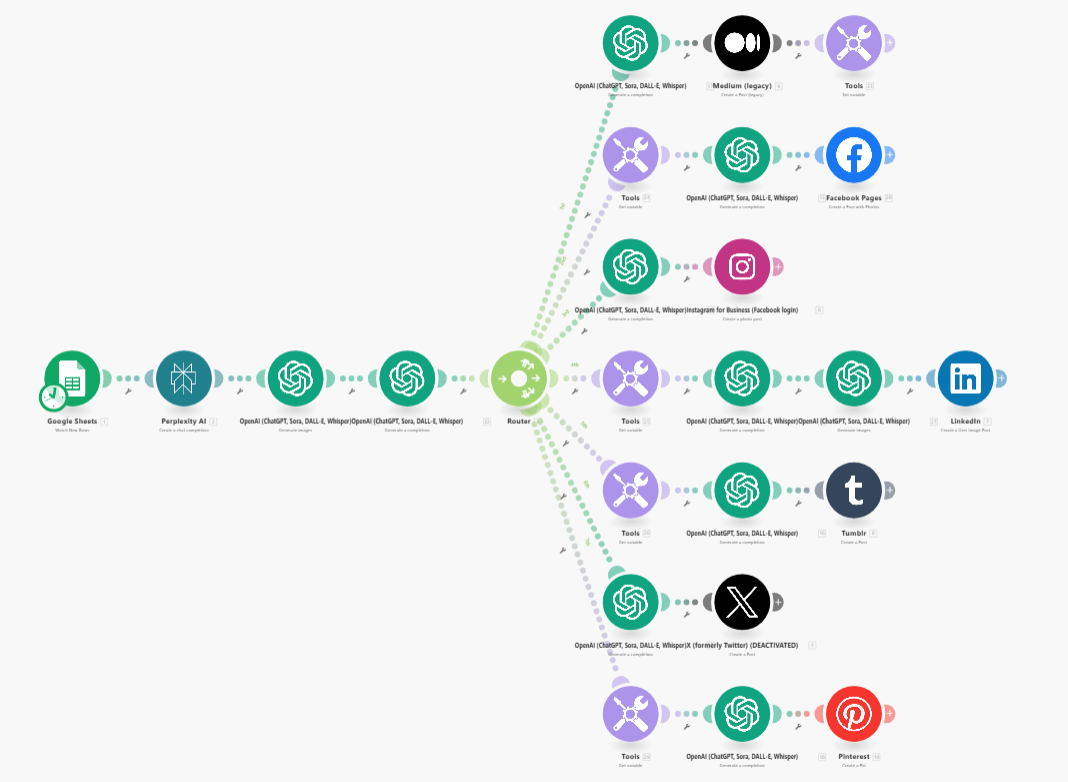
A no-code automation can keep your content pipeline running even when you’re not online. Every time you publish something new, the workflow automatically pulls your title, link, and featured image, and posts it across your preferred social channels — whether that’s LinkedIn, X (Twitter), or any other platform your audience uses. You can even add scheduling logic to stagger posts over several days or integrate tools like Canva to generate visuals automatically.
Real-World Impact:
This is one of those deceptively simple no-code automation examples that completely changes how small businesses handle marketing. You show up consistently, drive steady traffic back to your site, and keep your brand top of mind — all without adding another repetitive task to your week.
4. The Invoice Follow-Up Hero
Problem:
Late payments are awkward. You don’t want to chase clients, but ignoring overdue invoices messes with cash flow. Sending reminders manually takes time — and emotional energy. So you delay it, hoping they’ll pay soon, and the cycle repeats next month.
Solution:
With a few clicks in Make.com, you can connect your accounting system (e.g., Lexoffice, QuickBooks, or Xero) with your email or CRM. The workflow checks for unpaid invoices after a set number of days and automatically sends a polite reminder email — complete with invoice number, due date, and payment link.
You can even add a second, softer reminder a few days later or notify your finance team in Slack if payment still hasn’t come through.
Real-World Impact:
This automation removes the emotional friction of “asking for money.” Payments come in faster, clients appreciate the professionalism, and you maintain a friendly tone every time. It’s one of the most practical no-code automation examples for improving cash flow without extra stress.
5. The AI Inbox Zero
Problem:
Your inbox is a battlefield. Customer questions, invoices, calendar invites, and newsletters all arrive in the same place, fighting for your attention. You spend hours each week sorting, tagging, and trying not to miss important messages — yet the chaos always creeps back. The more your business grows, the worse it gets.
Solution:
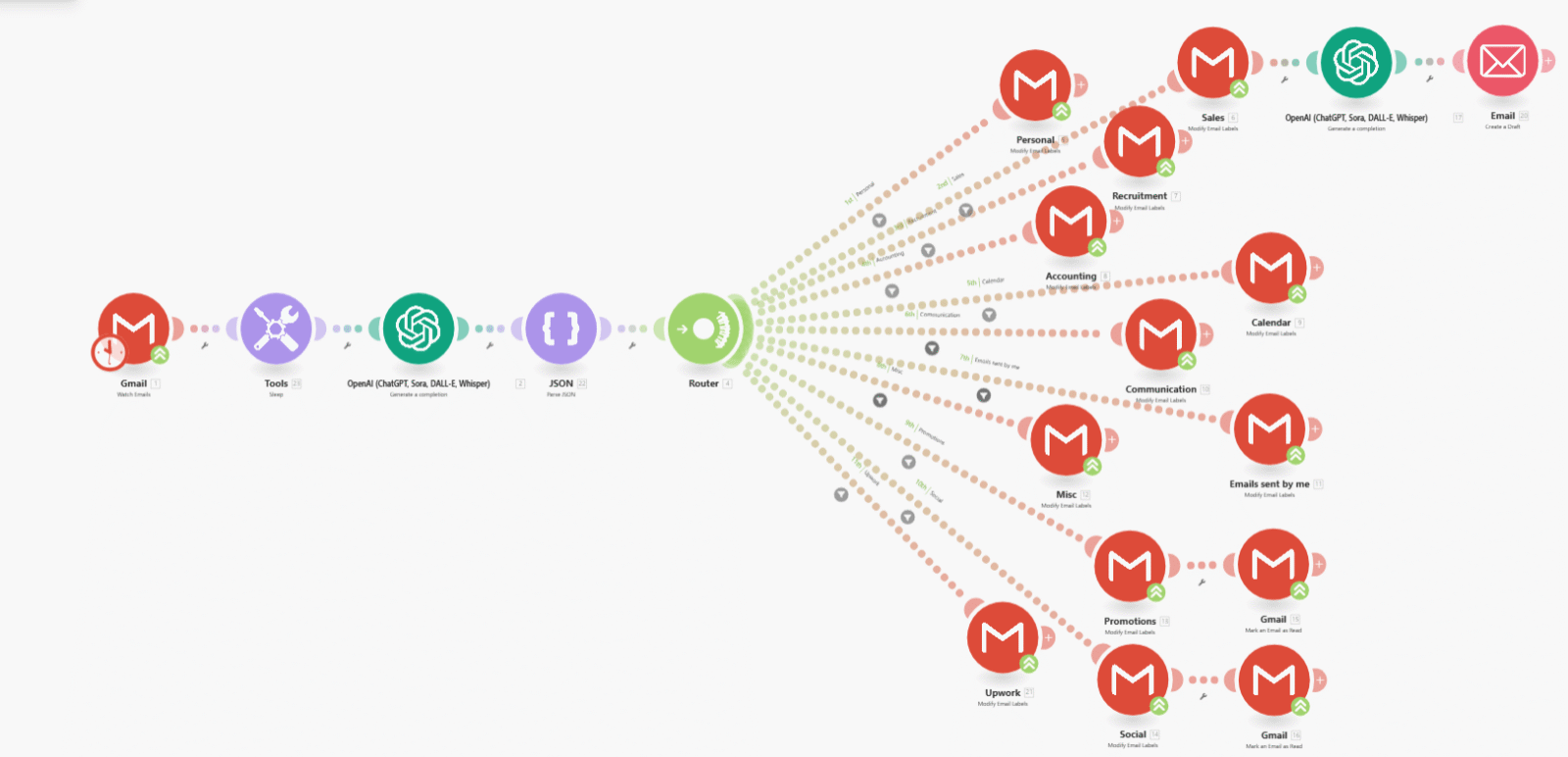
This AI-powered no-code automation takes inbox management off your plate. Built in Make.com, it connects to your Gmail account and uses OpenAI to analyze the content of each incoming message. Within seconds, it understands whether an email belongs to Accounting, Sales, Recruitment, Calendar, or Personal — and applies the right Gmail label automatically.
You can even extend it for customer support: flag urgent requests, prioritize leads, or forward client messages straight to your CRM or Slack. It’s a fully hands-off system that keeps communication organized 24/7.
Real-World Impact:
What used to take hours of manual sorting now happens instantly. Important messages never get buried, your inbox stays clean, and you reclaim valuable time each week. Businesses using this setup report faster follow-ups, fewer missed opportunities, and a calmer daily workflow.
It’s one of those no-code automation examples that quietly makes your workday — and your mind — a whole lot lighter.
Under the hood, these no-code automation examples run on the trio of Make.com, OpenAI, and GoHighLevel — a powerhouse mix that turns everyday tasks into seamless workflows.
How to Start Building (Even If You’re Not “Techy”)
You don’t need to overhaul your entire business to start.
Here’s the SongaAI approach — small, smart, and strategic:
1. Pick one repetitive task.
The smaller the better — something you do at least twice a week.
2. Define the trigger and the action.
Example: “When someone fills out this form, send them a welcome email.”
It’s the essence of simple no-code automation examples.
3. Choose your tool.
Start with GoHighLevel if you want an all-in-one platform for lead capture, CRM, follow-ups, and client communication — it can handle most automation needs on its own.
Use Make.com alongside it when you need to connect external apps or build multi-step workflows that go beyond GHL’s ecosystem.
The combination of both covers almost every automation scenario a small business will ever need.
4. Test before scaling.
Always use sample data before letting an automation run live.
5. Document everything.
Even simple automations deserve a name and a quick note on what they do.
(Trust us, future you will thank you.)
Once you’ve built your first few automations, it’s just as important to understand what not to do.
Even the smartest workflows can misfire without a few precautions — so before scaling, take a look at these common pitfalls.
Avoid These Rookie Mistakes
Even automation superheroes have their kryptonite.
Watch out for these common slip-ups when setting up no-code automation examples:
- Automating chaos. Clean up your process first — automation won’t fix a messy workflow.
- Skipping tests. One typo in a trigger can lead to very confused customers.
- Going too big too soon. Start with one workflow, get it right, and expand from there.
- Ignoring the human touch. Automation supports your relationships — it doesn’t replace them.
The Payoff: Real ROI from No-Code Automation
Time saved is great, but let’s talk numbers.
Small businesses using no-code automation examples report measurable results:
- 10–15 hours saved per week
- 20–30 % cost reduction on administrative work
- Fewer errors and faster customer response times
And here’s the fun part: those improvements usually show up within the first month.
If you’re wondering where to start measuring ROI, our previous post on Workflow Automation for Small Business breaks down exactly how to track your time and translate it into value.
Where No-Code Meets AI
No-code automation is powerful.
But when you combine it with AI — that’s when the real magic happens.
Imagine workflows that don’t just run tasks, but actually understand them:
- Classify incoming leads based on message intent.
- Summarize customer emails before you even open them.
- Write personalized follow-ups automatically.
Tools like Make.com and n8n already integrate with OpenAI, making it easier than ever to bring intelligence into your workflows.
At SongaAI, we help businesses turn that potential into real-world results — building automations that don’t just act faster, but think smarter.
Let’s Build Your First Automation (Together)
At SongaAI, we help small businesses design, build, and optimize automations that save time, reduce stress, and unlock growth.
Curious what these no-code automation examples could do for your business?
Book your free automation audit — we’ll uncover the workflows that save you 10 + hours a week, tighten your operations, and give you back the freedom to focus on what matters most.